
SLA Targets
The pipeline tracks a single response-time target: first contact within 5 minutes of a new lead arriving, unless your brokerage has set its own window (brokers change it under Lead Routing in the brokerage settings). Everything on this page describes what the system measures, what it shows, and what it does when the target is missed.
The target
Section titled “The target”| Target | Window | Measured from | Stops when |
|---|---|---|---|
| First contact | 5 minutes | The moment the lead’s intake event lands (contact_form_submission, admin walk-in, phone entry). | The first logged outreach event of any channel (call, email, text). That outreach also moves the lead NEW → CONTACTING. |
The 5-minute number is industry-standard, not arbitrary. Response-time studies have repeatedly shown that the probability of converting a lead drops sharply after the first five minutes and again sharply after the first hour. The target codifies what the rest of the industry already knows.
What the counter on a card shows
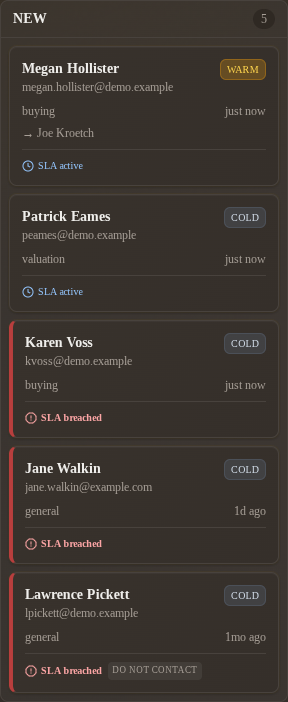
Section titled “What the counter on a card shows”A lead in NEW shows a live countdown chip on its board card, and every lead shows a response-clock card at the top of the Lifecycle card on its detail page. Three states:
| Status | Board card (NEW only) | Detail page | Meaning |
|---|---|---|---|
| Running | Chip counting down, e.g. 3m 41s left | ”Response clock running” with a live countdown and a progress bar | The clock is running. You’re still inside the window. |
| Met | Card has left NEW, so no chip | ”Responded in time” | First outreach was logged in time. The clock is frozen. |
| Missed | Red chip, e.g. 12m 06s over, and a red left border | ”Response window missed”, with how far past target | The window closed without a logged outreach. |
The same states feed the Response clock list on your dashboard’s Needs you now card: soonest-to-expire first, then the least-overdue missed ones.
On the detail page the timeline holds the rest: the Lead received row and the first Contact attempted row are the two timestamps the clock was judged between.
What happens at breach
Section titled “What happens at breach”| Behavior | Status today |
|---|---|
| The card’s chip turns red and the card border turns red on the board. | Shipped. |
| The Lifecycle card on the detail page shows “Response window missed” with the elapsed-past-target time. | Shipped. |
| The lead appears in the Response clock list on the dashboard’s Needs you now card. | Shipped. |
| You get one email when the window closes with no contact attempt logged. | Shipped. Sent to the assigned agent, or to the brokerage’s brokers when the lead is unassigned. Brokers can switch it off per brokerage. |
| The breach is recorded for reporting. | Shipped. The lead carries the time the alert went out, so a breach is never emailed twice. |
| You get a second email if you still have not logged anything. | Shipped. Sent to the same people as the first, 30 minutes after it unless your brokerage sets a different gap. |
| Your broker gets escalated if you still do nothing. | Shipped. Two hours after the lead arrived, unless your brokerage sets a different window, the brokers and owner get an email naming you as the agent who has not responded. The timeline gets an Escalated to brokers row from Scribe. |
| The lead is reassigned to a backup agent automatically. | Shipped, off by default. When a broker turns it on, the escalation also routes the lead to another eligible agent through the brokerage’s routing mode. The new agent gets the usual assignment email; the timeline shows Agent reassigned with the reason sla_escalation. |
| Your broker and the owner hear one last time if the lead is still untouched a day later. | Shipped. 1440 minutes after the lead arrived, unless your brokerage sets a different window, the brokers and owner get a final email naming whoever has the lead now and saying whether automatic reassignment already moved it. The timeline gets an Escalated again to brokers row. With reassignment on, the lead is routed once more, past every agent who has already had it. |
| Text message. | Shipped, off by default. When a broker turns on text message alerts and the platform has Twilio configured, every rung also texts the same people: you at your mobile number (or office line if that is all your profile has), brokers and the owner at the phone on their broker contact. You can opt out on your profile with Text me lead alerts. |
| Browser push notification. | Shipped. Each rung is also delivered as a browser notification when your brokerage enables the push channel and you have turned on the bell in the admin sidebar; see enable push notifications. Clicking the notification opens the lead. |
The check runs about once a minute inside the platform, with a scheduled job outside it as a backstop, so each email arrives within a minute or two of its moment. Logging a contact attempt at any point, from the board or the detail page, stops the clock and nothing further is sent.
The ladder
Section titled “The ladder”Each rung fires once per lead and only while no contact attempt has been logged. All four timings are per brokerage; brokers set them under Lead Routing. Every rung is an email, plus a text and a browser push when the brokerage has those channels on.
| Rung | When | Who gets it | What it changes |
|---|---|---|---|
| Breach | The response target closes (5 minutes by default). | The assigned agent, or the brokers when nobody is assigned. | Nothing. |
| Reminder | 30 minutes after the breach email by default. | The same people. | Nothing. |
| Escalation | 120 minutes after the lead arrived by default, and only once the target has closed. | The brokers and the owner. | An Escalated to brokers timeline row. With reassignment on, the lead moves to another eligible agent and an Agent reassigned row records who had it and who has it now. |
| Final escalation | 1440 minutes after the lead arrived by default, and only after the escalation. | The brokers and the owner, again. | An Escalated again to brokers timeline row. With reassignment on, the lead is routed once more leaving out every agent who has had it; if nobody new is eligible it stays put and the email says so. |
If reassignment is on but the routing pool has nobody else (a one-agent brokerage, or everyone else switched off as a lead recipient), the lead stays where it is and the escalation email says so. Reassignment never resets the clock: the new agent inherits a lead that is already overdue.
Switching off Email the agent when the response window is missed in the brokerage settings switches off the whole ladder, not just the first email.
How the counter is computed
Section titled “How the counter is computed”When you load a NEW card, the system reads the lead’s intake timestamp and looks for the first contact attempt in its timeline. The math is the obvious one:
- No contact attempt yet, less than the target elapsed → Running, with
target − elapsedremaining. - No contact attempt yet, more than the target elapsed → Missed, with
elapsed − targetover. - At least one contact attempt → Met if it was logged inside the window, Missed otherwise.
The server sends the remaining seconds with the board and the detail page (sla_remaining_seconds against sla_target_seconds) and the browser counts down from there, so the chip ticks live and flips to red at zero without a reload. The board also reloads itself after every action. It is still only a display: nothing fires on the server at the moment the window closes.
A backdated contact attempt (This happened earlier…) is judged against the time you enter, not the time you submit. If you called at minute three and log it at minute forty, the lead is Met.
What counts as “first contact”
Section titled “What counts as “first contact””Any of the following logged events satisfies the SLA the moment it’s recorded:
| What you did | Log it as |
|---|---|
| Called them, reached them or not | Log contact attempt, channel Call |
| Emailed them | Log contact attempt, channel Email |
| Texted them | Log contact attempt, channel Text |
| Met them at the office or an open house | Log contact attempt, channel In person |
| Anything else | Log contact attempt, channel Other |
One action, five channels. The clock stops on the first Contact attempted row whatever the channel.
What does not count:
- Opening the lead’s detail page. Reading is not outreach.
- Reassigning the lead to another agent. The new owner inherits the clock; they didn’t contact the lead.
- Setting a communication flag. Preference changes are not outreach.
- Saving Internal notes. The notes field is a scratchpad, not an event.
If you reach a lead by phone and forget to log the call, the SLA shows red even though you did your job. Logging is what stops the clock. If you remember later, log it with This happened earlier… set to when you actually called.
What CONTACTING and beyond do to the SLA
Section titled “What CONTACTING and beyond do to the SLA”Once a lead moves out of NEW, the SLA chip stops being displayed. The 5-minute target is only about first contact; it does not regenerate for subsequent outreach. There is no “second-contact SLA,” no “qualified-within-X-days SLA,” and no recurring response target later in the pipeline.
A lead that re-enters NEW via TRASHED → NEW (bad contact info replaced with a valid one) resets the clock from the moment of the contact_info_updated event. From the SLA’s perspective, that’s a fresh inquiry.
Reading SLA history later
Section titled “Reading SLA history later”Met or breached, the first-contact timing becomes part of the lead’s permanent timeline. The intake event has the original timestamp; the first outreach event has its own. The difference between them is the historical record of how that specific lead’s SLA played out, and it stays in the timeline even after the lead is in CLOSED.
A broker who wants to see “how often did we breach this quarter?” reads it from the timeline events, not from a separate SLA log. See interpret the lifecycle dashboard for the broker-side read.
Related
Section titled “Related”- Record first contact: the button that stops the clock
- State machine card — the
NEW → CONTACTINGtransition that stops the clock - Interpret the lifecycle dashboard — what a wall of red SLA chips means at the team level
- Why event sourcing matters — why the breach event is permanent, not a transient indicator