
Interpret the Lifecycle Dashboard
The lifecycle board at /admin/leads/board shows every active lead across 8 columns. As a broker, your job is not to scan individual cards — it’s to read the shape of the board.
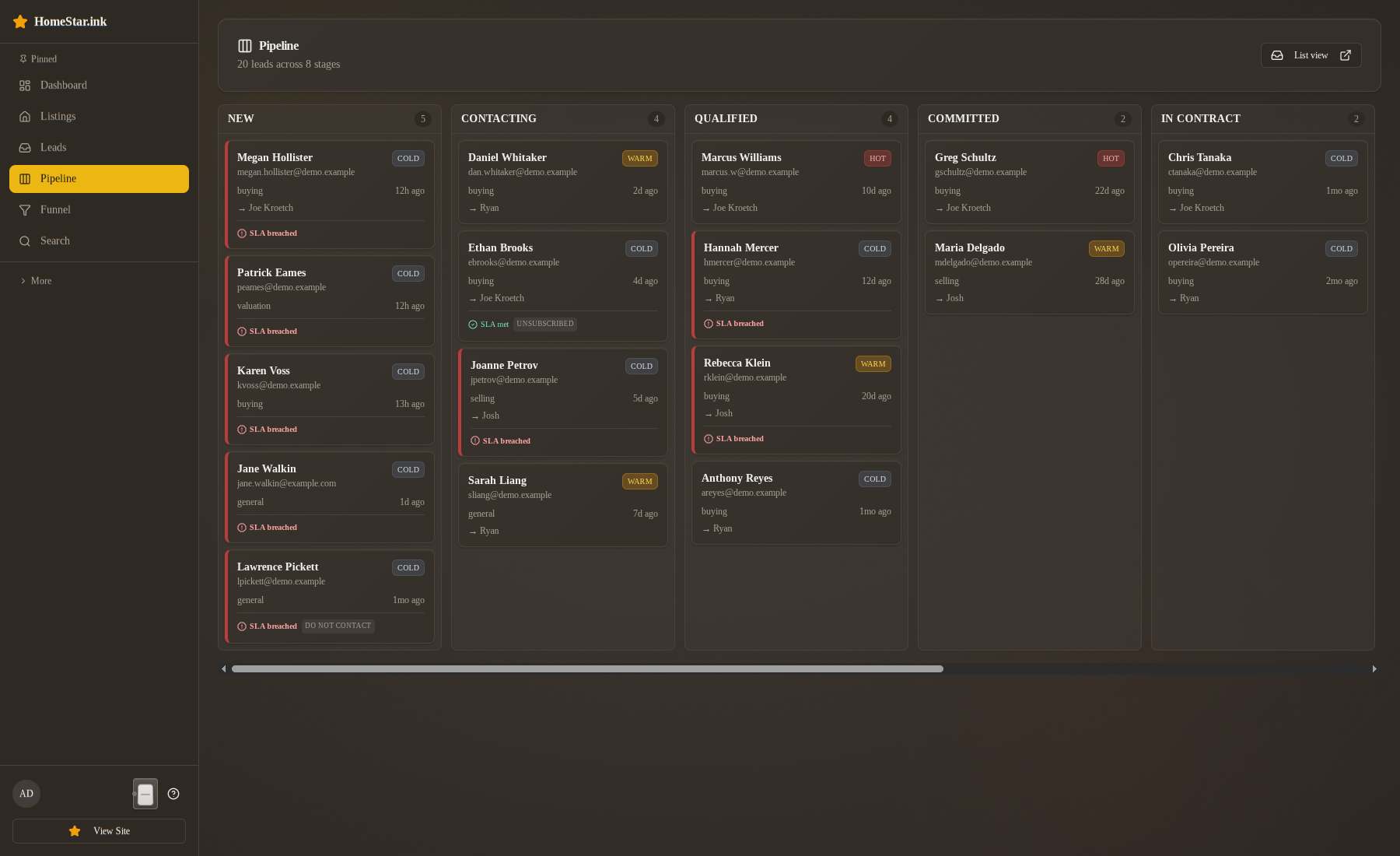
The header controls
Section titled “The header controls”Brokers and owners see the whole brokerage and get a Whole team / agent filter in the header to narrow the board to one person. Agents don’t get the filter; they only ever see leads assigned to them. Admins see every brokerage. The refresh button next to the filter reloads the board, and the board also reloads itself after every action.
Cards move by drag, or through the ⋯ menu on each card. Both open the same confirmation dialog the detail page uses, so a card cannot land in a column without the matching event and, where required, a reason. Columns the state machine does not allow dim while a card is being dragged.
The dashboard at /admin carries a Needs you now card at the top: a Response clock list (new leads with the clock running or missed, soonest first) and a Hot right now list (HOT leads in the active pipeline, highest score first). For you it covers the team; for each agent it covers only their own leads. It is the fastest read of “who is about to breach” without opening the board.
What to look at first
Section titled “What to look at first”A healthy board has a tapered shape: more cards on the left, fewer as you move right. Volume in NEW and CONTACTING should drop into a smaller QUALIFIED, a smaller COMMITTED, and so on. Closures are the smallest column because they take the longest.
The most useful glance is three things, in order: column heights, breach borders, and flag chips.
| Look at | What it tells you |
|---|---|
| Relative column heights | Where leads are accumulating vs. flowing through. |
| Red SLA borders in NEW | Cards that have already breached the 5-minute response target. Each is an opportunity that’s losing value by the minute. |
| Flag chips on cards | DNC, Unsubscribed, etc. — agents should be respecting these. Concentration of flags in one column may indicate over-aggressive outreach. |
Patterns to act on
Section titled “Patterns to act on”Pile-up in NEW with breached SLAs
Section titled “Pile-up in NEW with breached SLAs”If NEW is large and red, the team isn’t responding fast enough. Two possible causes:
- Routing: leads aren’t being assigned (or are being assigned to agents who are unavailable). Check whether
assigned_agent_idis being set at intake. - Response speed: agents are getting the leads but not acting on them within the window.
Look at the timeline on a few breached cards. If Lead received and Agent assigned are the only rows, the lead was routed and nobody touched it. If there is no Agent assigned row at all, routing never picked anyone.
Pile-up in CONTACTING with low temperatures
Section titled “Pile-up in CONTACTING with low temperatures”CONTACTING is supposed to be a transit column. A large CONTACTING with most cards trending Cold means outreach is going out but isn’t landing — agents are calling once and giving up, or the messages aren’t getting replies. Pair with the timeline: how many contact attempts are logged before the lead falls cold?
Thin QUALIFIED, fat COMMITTED
Section titled “Thin QUALIFIED, fat COMMITTED”Counterintuitive — leads are moving from QUALIFIED to COMMITTED without spending much time in QUALIFIED. Two reads:
- Good: agents are converting fast.
- Bad: leads are being marked COMMITTED prematurely (without a signed buyer’s agreement). Verify by sampling a few COMMITTED cards — the timeline should show a Buyer agreement signed row with the document reference in its note.
Anyone in ARCHIVED with rising temperature
Section titled “Anyone in ARCHIVED with rising temperature”ARCHIVED isn’t terminal. A lead in ARCHIVED with a temperature climbing back toward Warm has come back to the site on their own. Filter for state = ARCHIVED AND temperature ≥ 30 weekly — these are re-engagement opportunities the team should be assigning, not ignoring.
Hot leads sitting in any state for too long
Section titled “Hot leads sitting in any state for too long”A Hot temperature with no recent state change is a stall. The Hot right now list on your dashboard already sorts by score; look there for the highest-scored leads whose last timeline event is more than 48 hours old. Those are the cards to escalate.
What the dashboard does NOT show you (yet)
Section titled “What the dashboard does NOT show you (yet)”| Missing | Workaround for now |
|---|---|
| Aged-card alerts | Sort by state-entry time on the lead list; eyeball the oldest. |
| SLA breach notifications | Display-only today. The board and the Needs you now card show you which leads have breached; nothing pushes you a notification. Build the scan into your morning routine. |
Two things that used to be on this list have shipped: the per-agent filter in the board header, and reassignment rows on the timeline (Agent assigned while NEW, Agent reassigned afterwards, with the actor).
A weekly read
Section titled “A weekly read”The board is a daily-use tool for agents and a weekly-cadence tool for brokers. Once a week:
- Column shape — is anything bulging where it shouldn’t?
- NEW column SLA borders — is the team hitting the 5-minute target consistently?
- ARCHIVED reactivations — any leads warming back up?
- Cold leads in late columns — anyone stalled in QUALIFIED, COMMITTED, or IN_CONTRACT who shouldn’t be?
That four-question scan tells you where to spend your one-on-one time with agents this week.
Related
Section titled “Related”- State machine card — what each column means
- Temperature signals — what’s driving the Cold/Warm/Hot chips
- Why state and temperature are separate — why you read both axes