
Recovering an Archived Lead
This tutorial gives you practice with the ARCHIVED → CONTACTING re-entry edge. You’ll find an archived lead in the demo, read the engagement signals that suggest they’re warming back up, manually reactivate them, and see how the system records the recovery. Plan on 8 minutes.
By the end you’ll know:
- How to spot a recoverable archived lead vs. one that’s correctly set aside
- The two ways a lead leaves
ARCHIVED— automatic re-entry from behavioral signals, and manual reactivation - What changes in the timeline when you reactivate a lead
Before you start
Section titled “Before you start”Open the demo:
https://app.homestar.ink/admin/leads/board
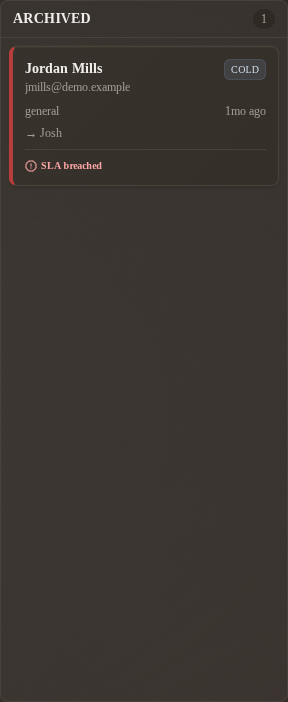
Click Admin demo login, then scroll the board to find the ARCHIVED column on the right side. The example in this tutorial uses a demo character named Dana Reyes — if your demo refresh has renamed the seed characters, pick whichever ARCHIVED card has the highest temperature score and the longest timeline.
Step 1 — read the column shape, not individual cards
Section titled “Step 1 — read the column shape, not individual cards”Look at the ARCHIVED column as a whole before opening anything. You’re looking for one signal in particular: a temperature chip that isn’t Cold.
Most leads in ARCHIVED will be Cold — that’s the natural state of someone who stopped engaging long enough to time out. But a Warm or even Hot temperature chip in this column is the system telling you: this lead came back to the site, and you should look.
A Warm-or-Hot card in ARCHIVED is the system telling you: this lead came back on their own, look at them.
Step 2 — open the lead and read the timeline backwards
Section titled “Step 2 — open the lead and read the timeline backwards”Click into Dana Reyes (or whichever card you picked). The timeline is the canonical history; it runs oldest first, so read it top to bottom to understand what happened.
You’ll see, roughly:
─ 4 months ago ─────────────────────────────────  Scribe — Lead received
─ 4 months ago ─────────────────────────────────  You (or a teammate) — Contact attempted   New → Contacting   [Email]  "Sent follow-up about the West End listing."
─ 3 months ago ─────────────────────────────────  You (or a teammate) — Archived: no response   Contacting → Archived
Two things are happening on this card:
- Old archive. The lead went quiet and a teammate archived them. That’s the last row.
- Recent temperature. The badge at the top of the Lifecycle card is Warm or Hot even though nothing new is on the timeline. The lead came back to the site on their own this week (property views, a favorite, a returned visit) and the temperature scorer noticed.
Those recent signals are why the card isn’t Cold anymore. It’s saying: this person is shopping again, even though they never replied to you.
Step 3 — decide whether to reactivate
Section titled “Step 3 — decide whether to reactivate”Not every warming-up archived lead should be pulled back into your active workflow. A few questions to ask:
| Question | If yes, reactivate. If no, leave archived. |
|---|---|
| Are the recent signals concrete? (property views, favorites, return visits — not just one page load) | Concrete = yes. One bounce = no. |
| Did you have a real conversation with them before they went dark? | Yes = warmer recovery is possible. No = they never engaged with you, just the site. |
| Is the original assigned agent still active? | Yes = they should be the one to reach back out. No = Re-engage will re-route it automatically. |
| Has it been long enough that their situation might have changed? (3+ months) | Yes — that’s often why they’re back. |
For Dana Reyes — concrete signals, prior conversation in the timeline, several months elapsed — this is a textbook reactivation case.
Step 4 — manually reactivate the lead
Section titled “Step 4 — manually reactivate the lead”You can let the system pull the lead back automatically (it will eventually, if the temperature climbs high enough), or you can do it now.
- On Dana’s detail page, under Next step in the Lifecycle card, click Re-engage. It is the only action offered from
ARCHIVED, and the button reads “Re-engage → Contacting”. - Add a short note: “Saw recent activity on West End listings, reaching out.”
- Click Re-engage.
The card moves from ARCHIVED to CONTACTING. A new row appears at the bottom of the timeline:
─ Just now ───────────────────────────────────── You — Lead re-engaged Archived → Contacting "Saw recent activity on West End listings, reaching out."If the original agent can no longer receive leads, a second row follows it, Agent reassigned, attributed to Scribe: the platform re-routed the lead through the brokerage’s routing mode.
Step 5 — make first contact (within reason)
Section titled “Step 5 — make first contact (within reason)”The lead is now in CONTACTING. The SLA clock does NOT restart for a reactivated lead — the 5-minute target is for fresh NEW inquiries. You have a normal follow-up timeframe.
That said: reaching out within a day is what makes the reactivation worth doing. The signal you saw (renewed browsing) is fresh. If you wait a week to call, the moment is gone.
Reach out, then log Lead responded when they get back to you (Log contact attempt is only offered from NEW). The pattern from your first day applies: log what happens, watch the timeline update.
What if the original agent is gone
Section titled “What if the original agent is gone”The lead’s assigned_agent_id may point at an agent who’s no longer at the brokerage or no longer taking leads. Re-engage handles that case: if the original agent is disabled, inactive, or not a lead recipient, the lead is re-routed through the brokerage’s routing mode and an Agent reassigned row attributed to Scribe follows the re-engagement row.
What you’ve practiced
Section titled “What you’ve practiced”- Spotting a recoverable archived lead by reading temperature signals against the column-default expectation
- Reading a timeline backwards to understand what happened to a lead
- Manually triggering
ARCHIVED → CONTACTINGvia the Re-engage button - Watching the timeline capture both the system’s observation and your manual action
Where to go next
Section titled “Where to go next”| If you want to… | Read… |
|---|---|
| Understand why archive is recoverable in the first place | Why archive isn’t terminal |
| Get fluent at reading timeline rows | Read the timeline |
| Know what the temperature chip on a card is computed from | Temperature signals |
| Look up the valid transition rules in one place | State machine card |