
View my data
The link in the card’s footer goes to /my-data, where every inferred preference and note is listed.
Scribe is the home finder on every tenant site. It is a small pill in the corner, a feather and a name, that opens a card reading like a page of notes someone kept while the visitor browsed: which town they keep returning to, the price band most of their clicks fell in, the lot sizes they lingered on. Under the notes is a thread where the visitor can say what browsing cannot show, and Scribe answers, changes the notes, or brings up homes. When the visitor agrees the notes are right, Scribe introduces the agents at the brokerage whose stated work is closest to them, and the visitor picks one.
Most real estate sites open with a questionnaire. Beds, baths, budget, area, before the visitor has seen a single listing. People fill those out badly because they do not yet know what they want; they find out by looking.
Scribe reverses the order. It says nothing until the visitor has opened a few listings, then shows what it wrote down, in plain sentences:
Most of what you opened was between $900k and $1.4M
Homes with 4+ bedrooms keep catching your eye
You went back to two listings for a second look
Each sentence carries a thin rule beside it. The darker the sentence and the heavier the rule, the more evidence sits behind it. There are no percentages on the page; a person taking notes does not annotate them with confidence scores, they just press harder on the things they are sure of. Things the visitor keeps skipping past are written as struck-through lines rather than warnings.

Under the sentences sit short chips ($900k to $1.4M, Post Falls, 4+ beds) so the same notes can be read at a glance, and then the thread, which opens with one line: “Or just tell me. Five bedrooms, near a school, room for a shop.” On a site where the brokerage has turned the thread off, a plain box labelled “Anything I missed?” stands in its place for the things browsing cannot reveal.
The card moves through three states. Each is one screen; the transition is a single slide. The thread stays under the notes in all three.
The notes under the brokerage’s name. This is the brokerage speaking, not any one agent, which matters: nobody has been assigned yet, so nobody is being sold. From here the visitor can see the homes the notes point at (“Show me homes that match” turns the same preferences the sentences came from into filters; on a phone that opens the search page, on a wider screen it opens the full view with the matches in the homes pane), put the card away for a day, or move on with “Looks right, find me someone”.
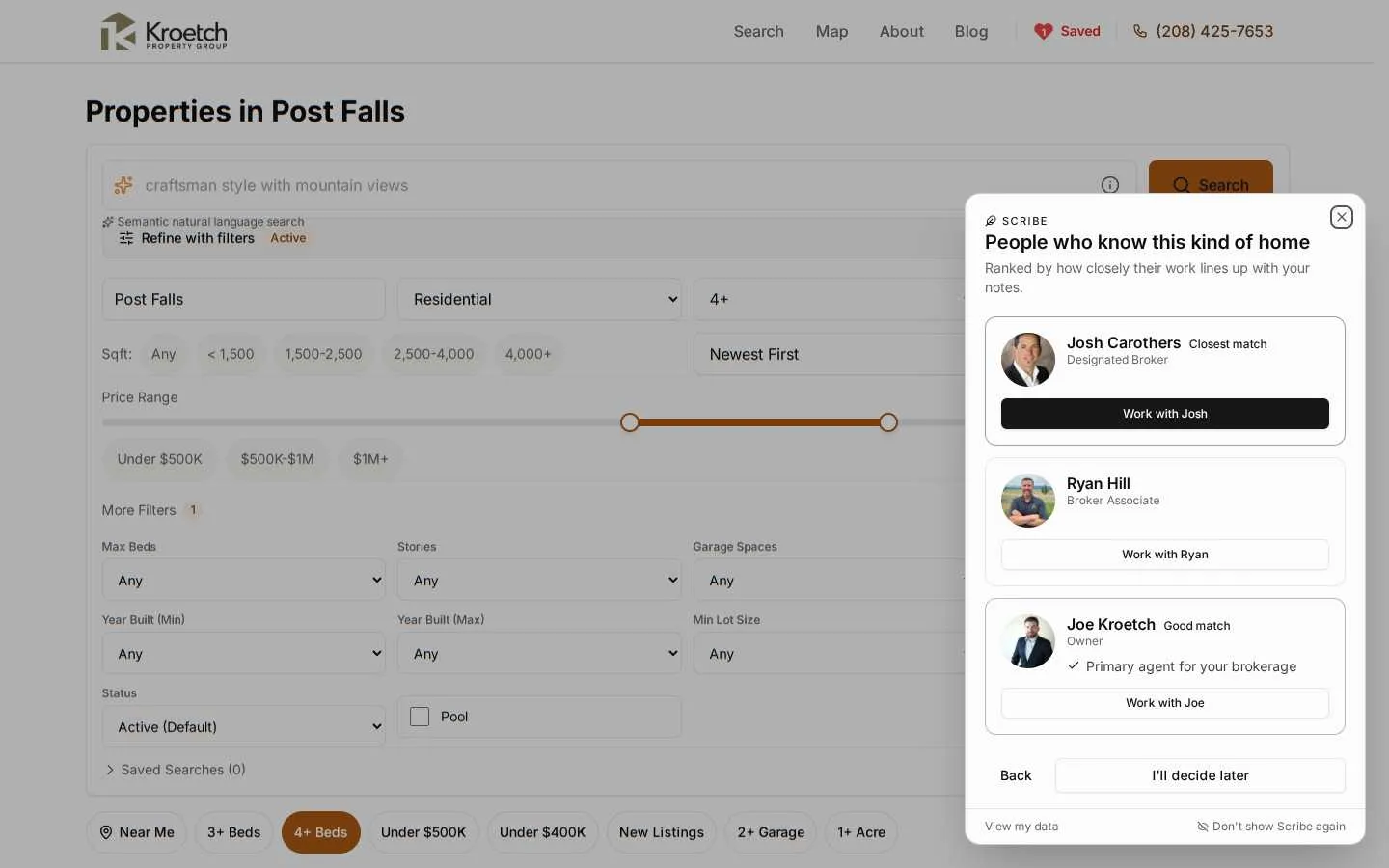
A ranked list of up to three agents, one column at every screen size. Each card is a photo, a name, a title, a match label in words, and up to two reasons drawn from the agent’s own profile (“Expert in Post Falls”, “Specializes in $800,000 to $1,500,000 range”). The first card is marked “Closest match” and has the filled button.
The same notes, now addressed to the chosen person by first name, with the thread and two actions: show matching homes, or connect. Connecting expands a short form inside the same card. The message that will go out is shown above the fields, composed in the visitor’s own voice from the notes (“I’ve been looking at 4+ bed homes in Post Falls, around $900k to $1.4M…”), so there is nothing to type beyond a name and an email.
Under the notes, in every state of the card, the visitor can type. “Actually we need five bedrooms.” “What’s near a good school.” “Show me what matches.” “Why did you think I wanted acreage.” Scribe answers in a sentence or two, and when the answer needed a search, listing cards follow it.
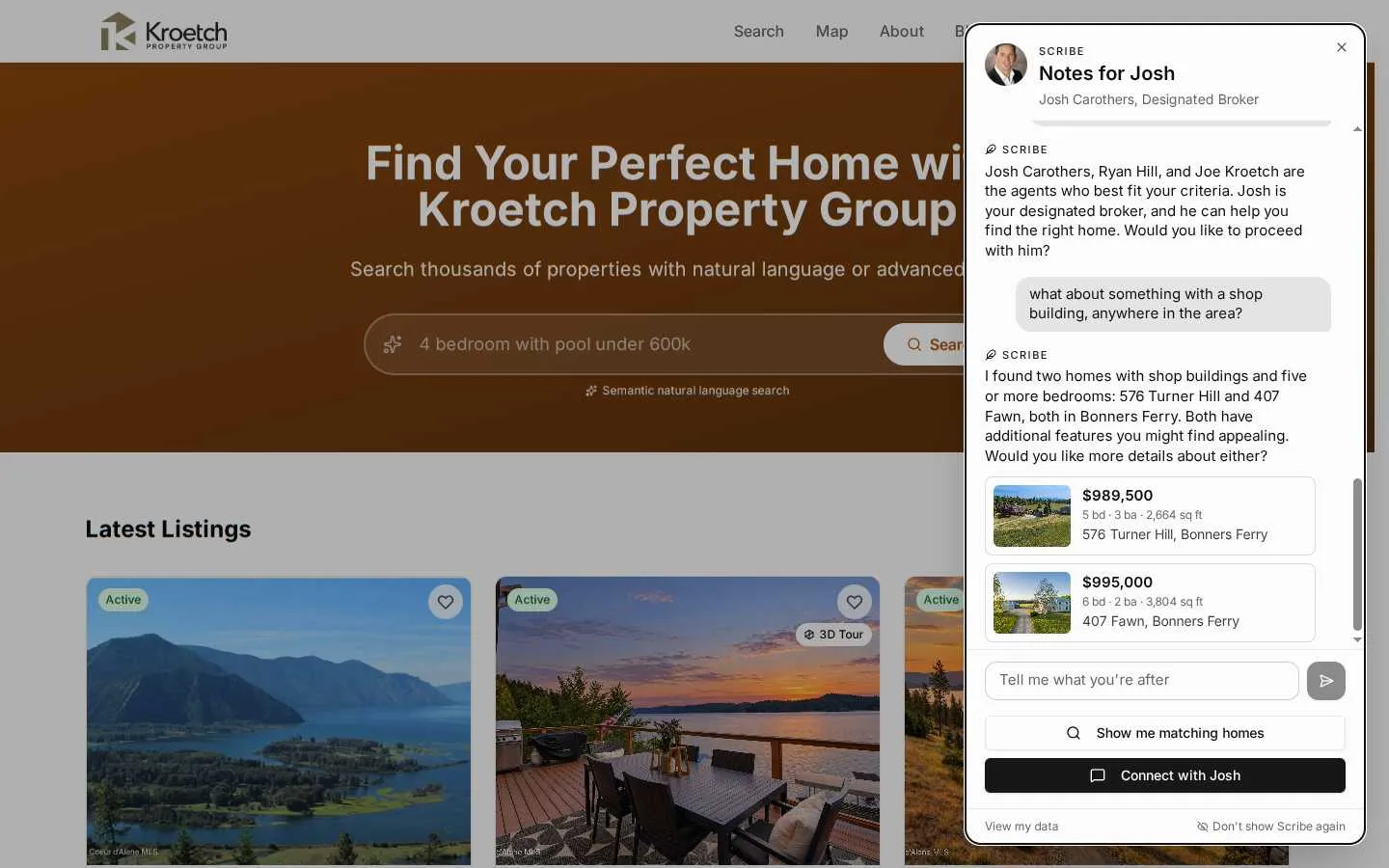
It would have been easier to put a chat window in the other corner of the page. It would also have been a second product. The notes are the thing; the thread is a way of editing them by talking. So it shares the card, sits under the sentences, and every reply that changes a note makes the sentences above redraw in the same moment. The two can never disagree, because there is only one set of notes and the thread reads from it and writes to it. The “Anything I missed?” box is gone on sites with the thread on, since the thread is the same invitation with an answer.
The gates exist so that Scribe never claims to know something it has not seen. A visitor who types “we need five bedrooms” has just handed it evidence directly, and better evidence than three clicks. So a stated wish is written down as a confirmed note at full confidence. It replaces whatever was guessed for the same thing, and the sentence reads “You told me: 5+ bedrooms” rather than “Homes with 5+ bedrooms keep catching your eye”. A visitor who opens the card cold, before opening a single listing, and says what they want has notes at once. The thin progress bars keep reporting the view gates honestly; they are simply no longer the only way in.
The thread is not free to invent. Scribe has six things it can do: change the notes, search the brokerage’s listings, read one listing, rank the agents, pick one, and open the connect form. Every search goes through the same public listings handler the site uses, so the per-feed display rules apply to the thread exactly as they apply to the search page, and a sold price never reaches it. The rules Scribe works under follow from that: it does not say a note changed unless it changed one; it does not say it searched unless it did; it names homes by street address, never by id; it never quotes a closing price.
One rule is worth spelling out. A search can filter on beds, price, city and the like, but “room for a shop” or “near a good school” is not a filter. For those, the search ranks listing descriptions against the words, which yields a likely match and not a fact. So Scribe says the homes “came up for” a shop rather than that they “have” one, and offers to look closer at one before saying more. When the visitor offers a phone number or an email in the thread, Scribe does not take it; it opens the connect form, which is the one path that creates a lead.
The thread is stored with the session, not the browser tab. Reopen the card tomorrow and the conversation is there, scrolled to the newest line. “Delete everything” on /my-data removes it with the rest of the session. When the visitor connects, the conversation is linked to the lead: the agent sees a “Scribe conversation” card on the lead page with the whole transcript, and the last six lines land in the lead’s notes under “From the Scribe thread:” so the gist is visible without opening the card. Nothing about the conversation is tied to a name until the form is sent.
The corner card is the right shape and, once a conversation gets going, the wrong size. Six listing cards bury the reply they came with, one line of the thread is visible at a time, and there is no room for a map or a listing’s details without leaving the conversation. So on screens 768px and wider the card can open into a full view under the site header, and the same view is a page of its own at /scribe on every tenant site for anyone who wants to link to it.
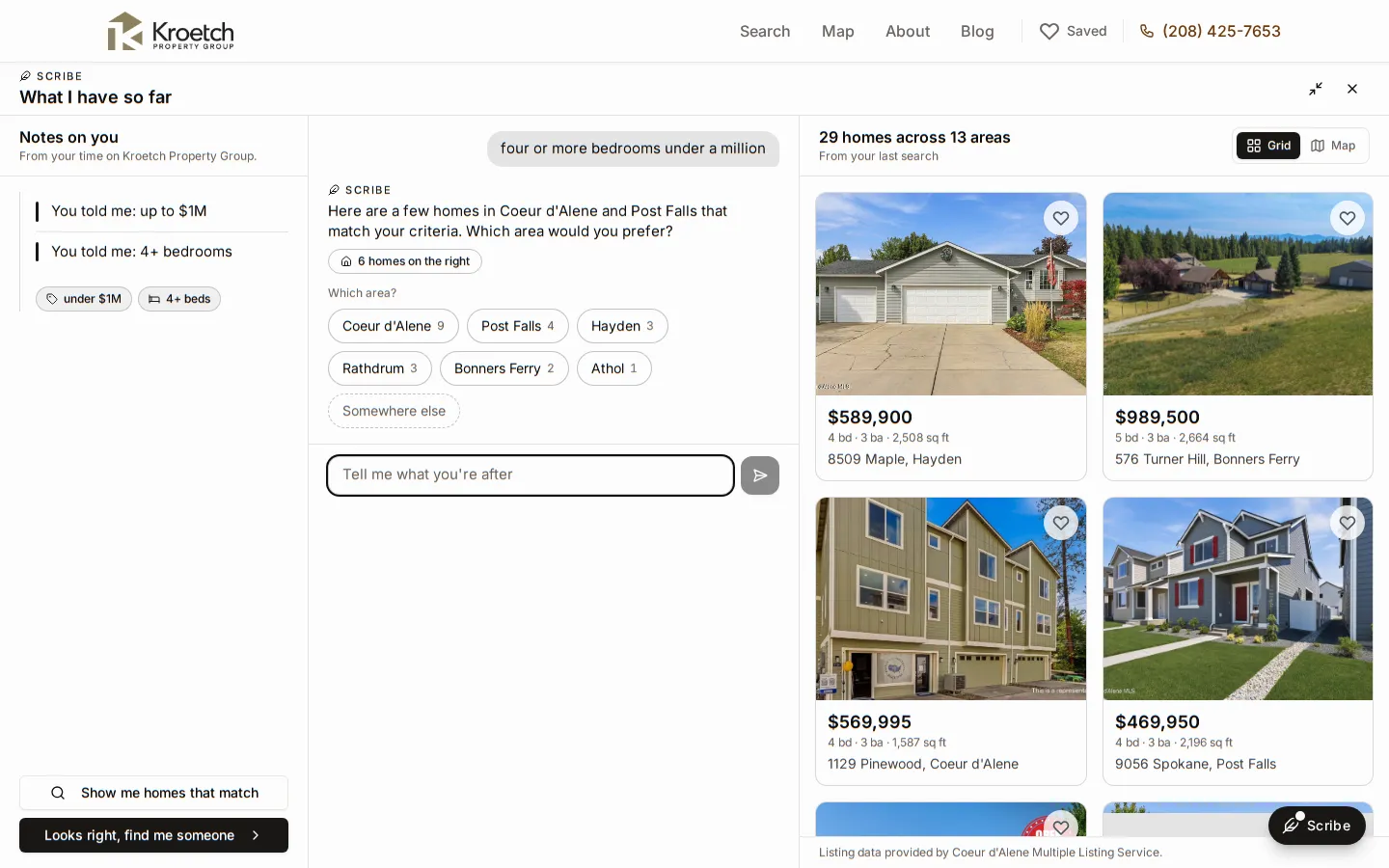
The corner card and the full view are not two products and not two conversations. They are one session drawn at two sizes. Expanding is a change of frame, not a navigation: the notes, the thread, the half-typed line in the composer and the agent already chosen all carry over, and collapsing brings the corner card back exactly as it was. The /scribe page is the same view mounted on its own, with nothing else on the page, so a link to it opens straight onto the visitor’s notes and thread; ?listing=ID opens a listing’s details and ?view=map starts on the map.
The full view does not poll. The corner card refreshes every 30 seconds while it is closed because it has to notice when the notes are ready; the full view is open in front of the visitor, so it refreshes when it mounts, when a reply changes the notes, after an agent is picked, and when the window regains focus.
Three columns at desktop widths, left to right:
At 1024px the notes column narrows and can fold to a rail. Between 768 and 1023px the notes shrink to a strip of chips under the header with a “2 notes” button that opens the full notes as a side sheet, and the conversation and the homes become two tabs. Under 768px nothing changes: phones keep the bottom sheet, and the /scribe page renders as a single column with the cards inline.
A search for “four or more bedrooms under a million” matches 29 homes across thirteen towns. The reply used to name six of them and stop, and the six newest were often all in the same town. Two things changed.
The first is what the reply is told. Scribe’s search now counts the whole match by town in one query, the same count the search page’s facets use, so when it says the homes are spread across thirteen areas the number is real and not a guess from the six cards. The cards themselves are picked across towns so the visitor sees the spread rather than one street.
The second is how the question gets asked. When a match is wide (more than twelve homes in more than one town), the reply asks which area in one short sentence, and the areas appear as buttons under it: the town, its count, and a trailing “Somewhere else” that puts the cursor in the composer. Tapping a town sends it as the visitor’s next line, exactly as if they had typed it. Buttons carry the counts so the reply does not have to list them, which keeps the prose to one question and keeps the counts honest, since a sentence that recites nine numbers from memory is the kind of thing a model gets wrong. The chips appear in the corner card too; they were never a full-view feature, only more legible there.
Opening a listing from the results used to mean leaving. In the full view it opens a panel over the homes pane: photos, price, address, the facts, the description, the listing office. The notes and the thread stay where they are. That matters because the point of looking at one home mid-conversation is usually to say something about it, and the panel has two ways to do that: “Connect about this home” opens the connect form with the address already in the message, and “Ask Scribe about it” (under whatever name the brokerage gave it) fills the composer with a question about that listing and leaves the sending to the visitor. “Open the full page” is still there for the listing page itself.
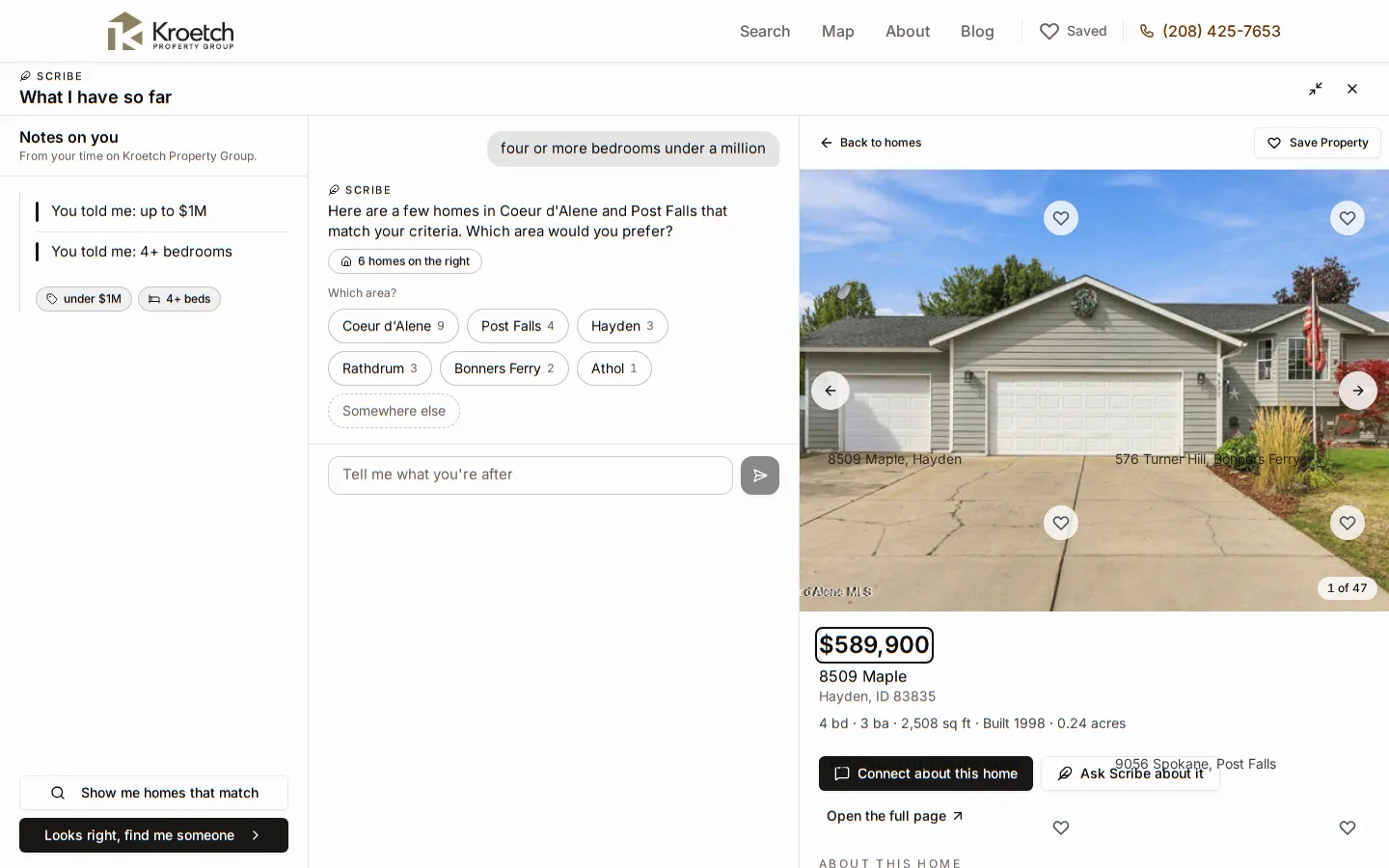
The panel reads the same public listing endpoint the listing page reads, so the display rules hold: a withheld address reads “Address withheld by the seller”, a closing price never appears, and a listing that has gone off market since the search says so rather than showing a stale copy. The map has the same discipline. A pin needs coordinates, and a listing whose seller withheld the address has none, so it stays in the strip under the map with a note that it has no map location.
Every brokerage already has lead routing: round robin, subject-based, semantic, or a primary agent. A contact form submission goes through it and the visitor never learns who they got.
Scribe deliberately does not use it. The visitor sees the ranked agents, the reasons, and chooses. The lead lands directly on the chosen agent and the timeline records it as chosen by visitor rather than routed. Two reasons for that:
The first is honesty. Scribe has just shown the visitor a page of notes about themselves and asked “looks right?”. Following that with an assignment made behind the curtain would undercut the whole exchange.
The second is that a chosen agent is a warmer lead than an assigned one. The visitor has read the agent’s specialties and decided this is the person. The first call starts from “you picked me because I know Post Falls”, not from cold.
The ranking that produces the list compares the visitor’s notes with each agent’s stated specialties, service areas and price range, as text, so an agent who wrote “waterfront and acreage north of the lake” ranks well for a visitor who kept opening six-acre lots even though neither wrote the word “acreage” the same way. Agents who leave their matching profile empty rank on whether they are the primary agent, and little else. See Semantic Lead Matching for the mechanism and Configure Your Profile for what to write. Asking the thread “who here knows this kind of home?” runs the same ranking and moves the card to the same picker.
Scribe stays quiet until three things are true: the visitor has opened enough distinct listings, enough time has passed since their first event, and the notes it would show are, on average, confident enough. The defaults are three listings, two minutes, and 0.5. A visitor who tells the thread what they want skips the wait, as described above.
An earlier version waited ten minutes. That single rule meant the card almost never appeared: most visits are shorter than ten minutes, and the ones that are longer often belong to someone who left a tab open. Wall-clock time is evidence of nothing. What Scribe needs before it can say “most of what you opened was in Post Falls” is several opened listings and a pattern among them, so those are the gates that carry weight. Time stays as a brake against a visitor who opens three tabs in ten seconds, and defaults low.
Until the gates are met the card does not pretend. It shows the three measures as thin bars (“Homes opened, 2 of 3”, “Time looking, Done”, “How sure I am, 30% of 50%”) so the visitor can see what would change the answer, with the thread underneath for anyone who would rather just say.
The pill itself does not nag. It gains a small dot when there are notes the visitor has not read, and loses it when the card is opened. There is no pulsing and no counter.

Nothing about a visitor is stored under a name until they send the form. When they do, four things happen at once. The lead is created on the chosen agent with via scribe on its timeline. The client record picks up the high-confidence preferences (budget, minimum beds, areas, property types) so the CRM’s fields are filled before anyone types. Whatever the visitor wrote as a note, in the box or through the thread, lands on the lead as “From browsing session:” so the agent reads it on the lead page without opening the client. And if there was a thread, it is linked to the lead and its last lines are added under “From the Scribe thread:”.
These have not changed. Scribe reads behaviour, not identity, and every control sits on the card or on the /my-data page.
View my data
The link in the card’s footer goes to /my-data, where every inferred preference and note is listed.
Not now
Puts the pill away for 24 hours. Stored in the browser only.
Don't show again
Hides Scribe for good on that browser. The /my-data page can turn it back on.
Delete everything
The /my-data page can clear the whole session: events, preferences, notes, the thread and the session itself.
“Scribe” is the default name. A brokerage can rename it (2 to 60 characters), hide it entirely, turn the thread off while keeping the notes, or choose which model writes the replies, all from the brokerage editor; the pill, the card’s heading, the replies and the “Don’t show … again” link all follow the name. See Configure Scribe.