
Configure Scribe
Scribe is the pill in the corner of every tenant site that takes notes while a visitor browses, answers when the visitor talks to it, and then introduces an agent. It is on for every brokerage by default, called “Scribe”, with the thread on and the platform’s default model answering. All four are per-brokerage settings: a brokerage can hide it, rename it so the pill and the card speak as “Notes” or “Quill” or whatever suits the brand, keep the notes but turn the thread off, or pick a different model from the platform’s allowlist.
What Scribe does for visitors is in Understanding Scribe. This page is only the switches, the name and the model.
From the brokerage editor
Section titled “From the brokerage editor”- Open Admin, then Brokerages, then the brokerage, then the Features tab.
- Scroll to the Scribe card. It sits after the feature flags and before Lead Routing.
- Show on the site is the main switch. Off removes the pill from every page of that brokerage’s site. Browsing is still recorded, so leads that arrive through the contact page still carry their notes; only the card is gone, thread included.
- Display name is what the pill says and what the card calls itself. Leave it blank for “Scribe”. Anything you type is trimmed and must be 2 to 60 characters; the counter appears once you start typing.
- Conversation is the thread under the notes. On, visitors can type what they are after and Scribe answers, updates the notes, searches listings and can hand off to an agent. Off leaves the notes alone: the card shows the sentences and a plain “Anything I missed?” box instead of the thread, and the site never calls the thread endpoints.
- Model is which model writes the replies. The first option, Platform default, names the current default in brackets (
Platform default (qwen3)) and is the right choice unless you have a reason. The rest of the list is the platform allowlist. The select is greyed out while Conversation is off. A model that was saved earlier and has since been removed from the allowlist is still shown so you can see it and change it. - Watch the Preview box. It renders the real pill, twice: plain, and with the dot that means there are unread notes. It uses the brokerage’s primary colour when one is set, so what you see is what the site shows.
- Save.
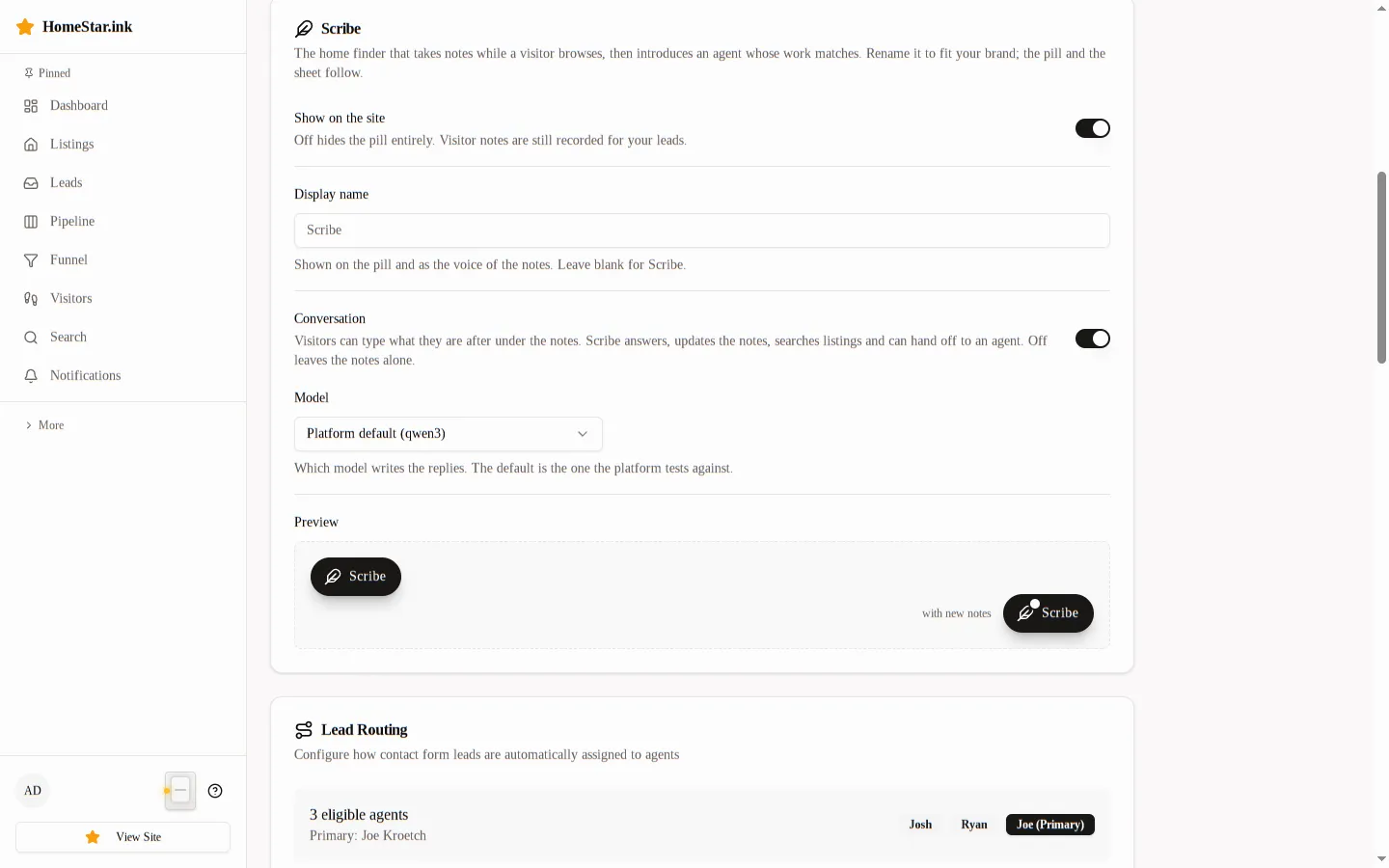
The name appears in six places on the site: on the pill, as the small heading above every card title and above the full view, above each of Scribe’s replies in the thread, in the “Don’t show … again” link in the card’s footer, on the listing panel’s “Ask … about it” button, and in the pill’s accessible label. The sentences in the notes are written in the second person (“You keep coming back to Post Falls”) and do not use the name, so a rename never produces an awkward sentence. The thread’s replies are written by the model as the named home finder for the brokerage, so a rename carries into them on the next turn.
The model allowlist
Section titled “The model allowlist”The list the Model select offers is a platform setting, not a brokerage one: SCRIBE_CHAT_MODELS on the API service, a comma-separated list defaulting to qwen3,qwen3.8,gemma4,llama3.3, with SCRIBE_CHAT_MODEL (default qwen3) as the default a brokerage gets without a pick. The default is always offered even if the allowlist leaves it out. Every entry must be a name the gateway serves; the platform tests the default and offers the rest as they were smoke-tested for tool calling.
Changing either variable needs the API container recreated (docker compose up -d idx-api), not restarted. A brokerage whose saved model falls off the allowlist keeps working with that model until someone changes it in the editor; the editor shows it so that can happen.
From the onboarding YAML
Section titled “From the onboarding YAML”The same four settings live in the brokerage spec under an optional scribe block:
scribe: enabled: true display_name: "Notes" chat_enabled: true chat_model: ""| Key | Meaning |
|---|---|
enabled |
The Show on the site switch |
display_name |
Whitespace collapsed, 2 to 60 characters; empty or omitted means “Scribe” |
chat_enabled |
The Conversation switch |
chat_model |
A name from the allowlist. Empty or omitted means the platform default. A name outside the allowlist stops the run with scribe.chat_model must be one of: ... |
Each key is applied only when present, and leaving the whole block out of a re-run keeps whatever the editor last saved, so a spec written before a setting existed does not switch anything off. See Tenant Onboarding for how make onboard-brokerage is run.
How it reaches the site
Section titled “How it reaches the site”The public site reads the settings from GET /api/public/site-config, which always carries:
"scribe": { "enabled": true, "displayName": "Scribe", "chat": true }displayName is the stored name or the literal "Scribe". chat is enabled and the Conversation switch together, so a site with Scribe hidden never reports the thread as on. The site layout mounts the pill only when enabled is true and passes chat to the card, which renders the thread and its composer only when it is true. The model is not exposed on site-config; the thread endpoint reports the effective one.
The full view (the expanded card on screens 768px and wider, and the /scribe page on every tenant site) needs no setting of its own. It inherits all of these: it speaks under the display name, it renders the thread only when the Conversation switch is on, and when Show on the site is off the expand control is gone with the card and /scribe sends the visitor to the home page. The /scribe page is marked noindex and is served only on tenant hosts; platform hosts send it home too. What it shows visitors is in Using Scribe.
On the admin API the fields are scribe_enabled (boolean), scribe_display_name (string or null), scribe_chat_enabled (boolean) and scribe_chat_model (string or null) on GET, POST and PATCH /api/admin/brokerages/{id}. A name outside 2 to 60 characters is a 422 with "Scribe display name must be 2 to 60 characters"; a model outside the allowlist is a 422 whose message contains must be one of; an empty string for either is stored as null. The exact shapes are in Scribe API.
Readiness gates and thread limits are platform-wide
Section titled “Readiness gates and thread limits are platform-wide”When Scribe first speaks is not a brokerage setting. The three gates (distinct listings opened, minutes since the first event, average confidence) are environment variables on the API service, SCRIBE_MIN_PROPERTIES_VIEWED, SCRIBE_MIN_SESSION_AGE_MINUTES and SCRIBE_MIN_CONFIDENCE, with defaults 3, 2 and 0.5. A visitor who tells the thread what they want is ready regardless of the gates. They are documented in Scribe Detection Reference.
The thread’s own limits are platform-wide too: forty messages per session per hour (SCRIBE_CHAT_MAX_TURNS_PER_HOUR), three tool rounds per turn, a 90 second timeout per call, and thirty stored rows of history handed back to the model. All of them, with their variables, are in Scribe API. Changing any of them needs the API container recreated, not restarted.